
We Dropped Google Fonts and Our Page Speed Score Jumped 30 Points
We built OptimAI to help people improve their SEO scores. So naturally we pointed it at our own landing page. The overall score was decent - 75 out of 100. But Page Speed was dragging everything down. It was stuck in the mid-60s, sometimes dipping into amber territory.
We had a hunch. Two lines in our HTML were loading fonts from Google's CDN. It turned out those two lines were responsible for over 3 megabytes of font data hitting every single visitor.
Here's what we found and how we fixed it.
The problem: what Google Fonts actually sends you
Our landing page used two Google Fonts families: Fredoka (headings) and M PLUS Rounded 1c (body text). The HTML looked like this:
<link href="https://fonts.googleapis.com/css2?
  family=Fredoka:wght@300;400;500
  &family=M+PLUS+Rounded+1c:wght@300;400;500;700
  &display=swap" rel="stylesheet">
Seems harmless. Two font families, a few weights. But here's what actually happens when a browser processes that link:
- DNS lookup to
fonts.googleapis.com - TLS handshake (new connection, new certificate negotiation)
- Download the CSS which contains
@font-facedeclarations pointing tofonts.gstatic.com - Second DNS lookup to
fonts.gstatic.com - Second TLS handshake
- Download the actual font files - and this is where it gets ugly
M PLUS Rounded 1c is a Japanese-origin typeface. It includes the full CJK character set - thousands of Japanese, Chinese, and Korean glyphs. Each weight file was around 1 megabyte. We were loading four weights. That's 4MB just for body text on an English-language page.
Google does serve subset hints via unicode-range, but the browser still needs to download the CSS, parse the ranges, and make conditional requests. On slower connections or first visits (no cache), the full penalty hits.
The icon font disaster
It gets worse. Earlier in development, we'd been using Material Icons - Google's icon font library. One import line:
<link href="https://fonts.googleapis.com/icon?family=Material+Icons"
  rel="stylesheet">
This loads a single font file containing every Material Design icon. All 2,000+ of them. We were using maybe 6 icons on the page. The font file itself is over 200KB compressed - but the real cost is the same render-blocking chain: DNS, TLS, CSS, then the font download.
We caught this one earlier and replaced it with inline SVG sprites. Six icons as inline SVG added about 2KB to the HTML. The icon font was adding a 200KB+ external dependency with two additional network round trips. That swap alone shaved 400ms off First Contentful Paint.
The fix: self-host and subset
The solution has three parts:
1. Download the font files
We downloaded the WOFF2 files directly from Google Fonts. WOFF2 is the modern compressed format - every browser made since 2016 supports it. No need for WOFF, TTF, or EOT fallbacks.
2. Subset to Latin characters only
This is the big win. We used pyftsubset from the fonttools Python library to strip out every glyph we don't need:
pyftsubset input.woff2 \
  --unicodes="U+0000-00FF,U+0131,U+0152-0153,U+02BB-02BC,
    U+02C6,U+02DA,U+02DC,U+2000-206F,U+20AC,U+2122,
    U+2191,U+2193,U+2212,U+2215,U+FEFF,U+FFFD" \
  --flavor=woff2 \
  --output-file=output.woff2
That unicode range covers Latin characters, common punctuation, the Euro sign, and a handful of special characters. It's the same range Google uses for its "latin" subset - but instead of relying on the browser to conditionally fetch the right subset, we just ship exactly what we need.
The results:
Fredoka was already smaller (it's a Latin-focused variable font), but subsetting still trimmed it from ~45KB to 29KB.
3. Self-host with preload
Instead of linking to Google's CDN, we serve the fonts from our own domain. The HTML changed from the Google Fonts link to:
<link rel="preload" href="/static/fonts/fredoka-latin.woff2"
  as="font" type="font/woff2" crossorigin>
<link rel="preload" href="/static/fonts/mplus-400-latin.woff2"
  as="font" type="font/woff2" crossorigin>
<link rel="stylesheet" href="/static/css/fonts.css">
The fonts.css file contains our own @font-face declarations with font-display: swap. The preload hints tell the browser to start downloading the most critical font files immediately, before it even parses the CSS.
Benefits:
- No external DNS lookups - fonts come from the same domain as the page
- No extra TLS handshakes - reuses the existing connection
- Browser caching - same cache rules as our other static assets
- No render blocking -
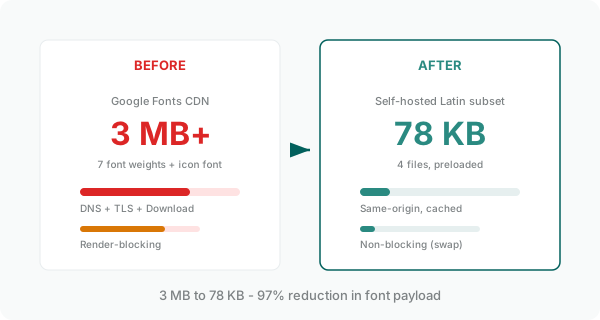
font-display: swapshows fallback text immediately - Total payload: 78KB for 4 font files (was 3MB+)
The results
We scanned our own landing page before and after the change using OptimAI. Here's what happened:
Core Web Vitals hit 99/100. The overall score went from 75 to 82 - and every single dimension turned green.
The font change wasn't the only thing we did in that session (we also fixed content quality scoring and trimmed external links), but Page Speed was by far the biggest single improvement. And the root cause was just two lines of HTML pulling in fonts from an external CDN.
Should you drop Google Fonts?
Not necessarily. Google Fonts is genuinely convenient, and for many sites the performance cost is acceptable. But you should know what you're actually loading.
Here's when self-hosting makes sense:
- You're using a CJK-origin font for a Latin-language site - you're shipping thousands of glyphs you'll never render
- Page speed is a priority - every external dependency adds latency, especially on mobile
- You're loading 3+ font weights - the payload adds up fast
- You're using an icon font for a handful of icons - inline SVG is always better
- You care about privacy - Google Fonts requests send visitor IP addresses to Google's servers
And here's when Google Fonts CDN is fine:
- You're using 1-2 weights of a Latin-focused font (e.g. Inter, Roboto)
- Your audience is on fast connections and the page isn't performance-critical
- You don't want to manage font files in your build process
How to check your own font situation
Open your browser's DevTools, go to the Network tab, and filter by "font". You'll see every font file your page loads, its size, and where it comes from. If you see files over 100KB or requests to external domains, that's your optimisation opportunity.
Or run a free scan on OptimAI - our Performance section shows you exactly where your page stands on Core Web Vitals and overall speed.
The takeaway
Fonts are one of the most overlooked performance bottlenecks on the web. They're invisible to most auditing tools because the individual files aren't huge - it's the cumulative effect of multiple weights, external DNS, TLS negotiation, and render-blocking CSS that kills your score.
Two hours of work. Four font files. A 97% reduction in font payload. And a 34-point jump in our Page Speed score.
Sometimes the biggest wins are the simplest fixes.
Want to find out what's dragging down your page speed?
Run a Free AI SEO Audit10 free page scans. No credit card required.