
The Scan-Fix-Rescan Loop: How to Maximise Your OptimAI Score
You've run your first OptimAI scan. You've got a score, a colour-coded breakdown, and a list of suggestions. Now what?
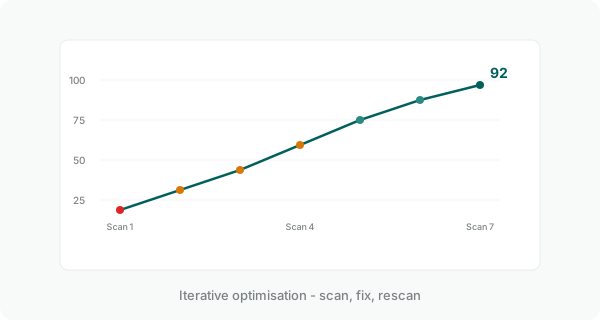
The most effective way to improve your score isn't to tackle everything at once. It's a simple loop: scan, fix the highest-impact items, rescan to measure progress. We've watched this pattern consistently lift scores by 15 or more points in a single session.
Why the loop works
SEO optimisation is incremental by nature. Every change you make affects multiple dimensions of your score. Fixing a meta description improves your On-Page SEO score, but it might also improve your Content Quality score if the description better reflects your page content. Adding FAQ schema improves your Technical Health and your AI Search Readiness simultaneously.
The loop works because it gives you immediate feedback. You make a change, rescan, and see exactly how many points it moved. No guessing, no waiting weeks for Google to re-index. The feedback cycle is measured in seconds, not months.
Step 1: run the initial scan
Enter your page URL and target keyword. OptimAI analyses 111 metrics across 20 dimensions and returns your scorecard in about 45 seconds.
The first thing to look at isn't the overall score - it's the colour coding. Each of the 20 dimensions is scored individually and colour-coded:
- Green (70-100) - healthy, low priority for fixes
- Amber (40-69) - needs attention, moderate impact
- Red (0-39) - critical, fix these first
Red and amber dimensions are your optimisation targets. Green dimensions can be left alone unless you're chasing a very high score.
Step 2: fix the highest-impact items first
Not all dimensions carry equal weight. OptimAI scores across five categories with different weightings:
- AI Search Readiness (40%) - the largest single category
- Content Quality (24%) - how well your content serves the keyword
- On-Page SEO (20%) - meta tags, headings, images, links
- Technical Health (10%) - schema, canonicals, robots
- Performance (6%) - page speed and Core Web Vitals
A red dimension in AI Search Readiness (40% weight) will drag your overall score down far more than a red dimension in Performance (6% weight). Fix the high-weight problems first.
Within each dimension, OptimAI shows you specific suggestions ranked by impact. Start at the top of each suggestion list and work down. You don't need to fix everything - focus on the changes that will move the score the most.
Pro tip: Export the PDF report, upload it to ChatGPT or Claude along with your page's HTML, and ask the AI to implement the suggestions for you. We've seen this approach fix 10+ items in a single session. The AI can rewrite meta descriptions, restructure headings, add schema markup, and improve content structure - all guided by the specific suggestions in your report.
Step 3: rescan and measure
After making changes, run another scan. Refreshes use fewer API calls than initial scans, so they cost fewer credits - you're tracking improvement against a known baseline, not discovering issues from scratch.
Compare the before and after. Which dimensions moved? Which suggestions are now resolved? If a dimension is still amber, check what's left in its suggestion list and decide whether the remaining items are worth the effort.
The history panel tracks all your scans for a given URL and keyword combination, so you can see your score trajectory over time. It's satisfying to watch those colours shift from red to amber to green.
Common first-loop wins
These are the changes that most reliably produce the biggest score jumps on a first pass:
Meta title and description
Most pages have meta descriptions that are either missing, too short, or too long. Google truncates descriptions over 155 characters, which means your carefully crafted text gets cut off in search results. Fix the length, include your target keyword, and make it compelling. This alone can swing your On-Page SEO dimension by 10+ points.
Heading structure
One H1 per page, containing your primary keyword. Subheadings (H2, H3) should be hierarchical - no skipping levels, no using headings for styling. A clean heading structure improves both On-Page SEO and AI Search Readiness because AI engines use headings to understand content hierarchy.
Image alt text
Every image needs descriptive alt text. Not "image1.jpg", not "hero banner", but a genuine description of what the image shows and how it relates to the content. This is one of the most commonly missed on-page factors, and it's a quick fix.
FAQ schema
If your page answers common questions (and most pages should), adding FAQPage schema markup gives you a significant boost in both Technical Health and AI Search Readiness. It's a one-time addition that pays dividends across multiple scoring dimensions.
Content depth
If your page is thin - under 300 words, or if it doesn't genuinely address the target keyword in depth - no amount of technical optimisation will save it. Content Quality has a 24% weight. The content needs to be substantive, specific, and directly relevant to the keyword.
When to stop looping
Diminishing returns are real. The jump from 50 to 70 is usually straightforward - fix the obvious problems and you're there. The jump from 70 to 85 takes more targeted work. Getting above 90 requires attention to detail that may not be worth the effort for every page.
A good rule of thumb:
- Below 50: Major structural issues - keep looping until you've cleared the reds
- 50-70: Solid foundation with room to improve - 2-3 more loop cycles should get you to green
- 70-85: Good shape - focus only on high-weight dimensions that are still amber
- 85+: Excellent - any further optimisation is marginal. Move to the next page.
Your time is better spent getting three pages from 60 to 80 than getting one page from 85 to 95. The aggregate impact on your site's visibility is much larger.
Beyond single pages
Once you're comfortable with the loop on individual pages, think about which pages to prioritise. Your homepage, your primary service pages, and your highest-traffic landing pages should be scanned first. These are the pages most likely to appear in AI-generated answers and the ones where score improvements translate directly into business results.
For agencies and consultants managing multiple client sites, the loop becomes your delivery workflow. Scan the client's key pages, fix the quick wins, rescan to show measurable improvement, and deliver the before/after report. It's a clear, repeatable process that demonstrates value on day one.
The takeaway
SEO optimisation doesn't have to be overwhelming. The scan-fix-rescan loop gives you a structured, measurable process that works for any page, any keyword, and any skill level. Start with the reds, work through the ambers, and stop when you hit green.
The most common mistake is treating the initial scan as a one-off audit. The real value comes from iteration. Every loop cycle gets you closer to a page that ranks well on Google, reads well for humans, and is structured for the AI search engines that are reshaping how people find information.
Ready to start your first loop?
Run a Free AI SEO Audit10 free page scans. No credit card required.